02:41. KafkaConsumerLagHigh: orders-consumer is 33,478
messages behind on the orders topic. The service is healthy, the consumers are running, and
nothing is broken. The correct response is to do nothing for about six minutes and then
confirm that doing nothing worked.
This is the alert we use to explain the product, because it is the one where the obvious automation — detect, diagnose, remediate — produces exactly the wrong behaviour.
Why lag alerts are different
Most alerts describe a state that is wrong. A lag alert describes a state that is temporarily unusual, and the distinction changes everything about how it should be handled.
| Cause of the backlog | Right response | How common |
|---|---|---|
| A traffic spike the consumers are working through | Wait. It drains. | Most of them |
| A deploy that paused consumption for a rolling restart | Wait. It drains faster than the spike case. | Common |
| An upstream batch that dumped a day of events at once | Wait, but check the ETA against the SLA. | Predictable, often weekly |
| Consumers crash-looping | Act. Nobody is consuming. | Uncommon and urgent |
| A poison message blocking a partition | Act. It will never drain. | Rare and nasty |
The first three want patience. The last two want a person, quickly. And critically: you cannot tell them apart from a single reading. 33,478 messages behind looks identical in all five cases. What separates them is what the number does over the next few minutes, and whether anything is consuming at all.
The runbook
lag_now
max(kafka_consumer_group_lag{group='{{group}}'}) — establish the number the alert is about, rather than trusting the one in the alert text, which is already stale.
consumers
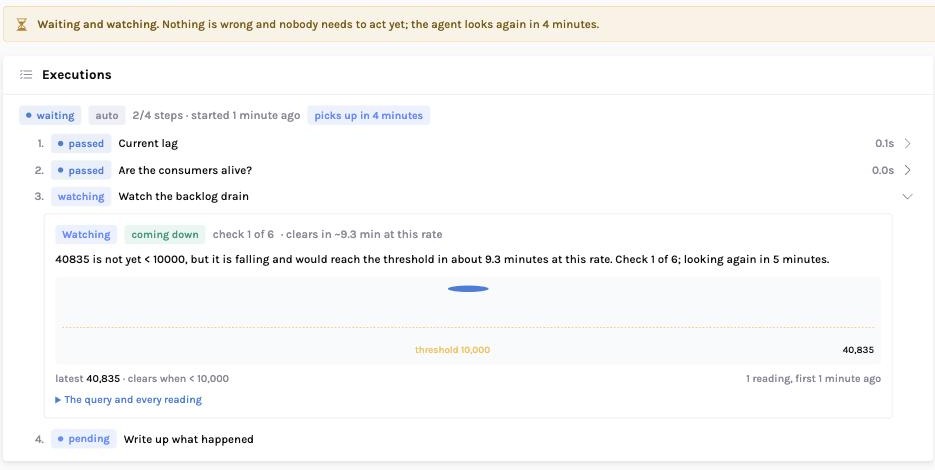
This is the step that separates “wait” from “act”. A backlog with nobody consuming is a different incident wearing the same alert.
watch
Clears when the lag falls below {{threshold}}. Looks every 5 minutes, up to 6 times, judging the direction from the series' peak. Parks the execution in between.
summary
Leaves the readings and the outcome on the record, so the next occurrence starts from evidence.
Four steps, and the interesting one is the third. It is not a sleep. It samples, judges, suspends the execution with a resume time, and is picked back up by whichever worker is free — surviving deploys and restarts, because the state is a database row rather than a held thread.
What happened, on a real stack
All three outcomes below were run against the demo stack rather than sketched. The numbers are the ones the agent actually recorded.
park, resume in 5 IR->>P: check 2 P-->>IR: 26,553 — still above threshold Note over IR: park again IR->>P: check 3 P-->>IR: 19,855 — below 25,000 IR->>IR: cleared → resolve, no action needed Note over IR: "19855 is < 25000 — the condition has
cleared on its own after 3 checks."
The trend calculation, and a bug worth knowing about
"Is it coming down?" sounds like a one-line question. It is not, and the way we got it wrong first is instructive because it is the obvious implementation.
The first version fitted a least-squares line across the whole fifteen-minute window. A backlog that jumped from zero to 30,000 and had been draining steadily for two minutes came back as rising — because the window still contained the jump, and a step change dominates the fit. The agent would then have escalated an alert that was already fixing itself, which is precisely the behaviour this runbook exists to prevent.
The fix, and the second-order problem it created
Measure from the series' peak, not the window start — what matters is the behaviour since the high point. That fixed the step-change case and immediately created another: a queue sitting flat at 20,000 with ±40 of jitter now had a slope, and got reported as "falling", promising a recovery that was not happening. So a direction is only named when the movement projected across the window is a real fraction of the level. Both cases are now unit-tested, because both were found by looking at output that seemed slightly off rather than by anything failing.
When it is not draining
Flip the scenario: consumers stalled, backlog climbing. The same runbook, no changes.
Check one: 38,314, rising. Check two: 46,128, rising. Check three: 53,188, rising — and the checks are used up. The agent escalates with: "Watched for 3 minutes over 3 checks and 53188 is still not < 10000; the trend is rising. This needs a person." Every reading is attached, so whoever picks it up starts with the series rather than with a single number.
Note that the escalation is later than a naive system would have paged, and that is the point. Those minutes were spent establishing that this is the rare case rather than the common one. Paging immediately would be right one time in five and wrong four times.
Tuning it for your estate
- Threshold. Take it from the alert label rather than hard-coding it, so
the runbook and the alert rule cannot disagree.
{{threshold}}resolves from the incident. - Interval and max checks. These are a statement about your SLA, not about Kafka. Six checks at five minutes tolerates a thirty-minute backlog. If your consumers normally drain in two minutes, shorten both and escalate sooner.
- Add the consumer-health check first. The step order matters: establish that something is consuming before you commit to waiting. Waiting on a dead consumer group is just a delayed page.
- Watch the Patterns page. If this alert fires weekly and always clears, the threshold is wrong and the honest fix is to change the alert rule rather than to keep automating around it.
The failure mode to avoid
Do not use a watch on a value that has never recovered on its own. That is a capacity problem wearing a monitoring costume, and watching it just moves the page thirty minutes later while the backlog grows. The tell is in the pattern history: repeated watches that all end in escalation.
Next in this series
High error rate after a deploy — the most common incident in production, and the one where the agent's conclusion has to be checked before anyone acts on it.